meviy
MiSUMi
Technical Information
Search
English
Deutsch
Français
Italiano
Español
Polski
Close
Technical Information
Sheet Metal Parts
Applicable parts/Materials
Shapes Eligible for Quotation
Types of Hole Machining
Material, Surface Treatment, Size
Material Standards and Materials Used
Delivery Options
Material Properties
Surface Treatment Characteristics
Plating / Plated Steel Color Comparison
Types of Paint Color
Specifications for Edge Breaking
Engraving application range
Bending and R-bending with special tools – Overview materials and sizes
Shim Plates
Parts Available for Clear Resin
Parts Eligible for Composite Sheet
Design Guidelines
Basic Modeling Rules
Hole Identification Specifications
Tapped Hole Identification and Selectable Sizes
Friction Drilled/Tapped Holes
Countersink Modeling and Selectable Sizes
About Threaded Insert Specifications
Hanging Holes for Plating/Painting
Modeling Rules for Keyhole Type Holes
Selectable nut sizes
Modeling Rules for Perforated Metal
Range of Machining Limits
Bending Conditions
Sheet Metal Quoting Error Troubleshooting
Accuracy and Machining Specifications
Allowable Dimensional Tolerances
Hole Machining Specifications
Bending Specifications
Appearance of Cut Surfaces
About Edge Breaking
About Hairline Direction
About pre-finished sheets
Engraving
About Painted Sheet Metal
Perforated Metal Machining Specifications
Clear Resin Specification
Composite Sheet processing specifications
Quality Control
Quality Control of Nut Mounted Products
Welded Sheet Metal
Applicable Parts/Materials
Shapes Eligible for Quotation
Material, Surface Treatment
Sizes Available for Quotation
Quotation Requirements for Welded Parts with Different Plate Thickness
Shipping Days
Delivery Options
Types of Paint Color
Specifications for Edge Breaking (Welded Sheet Metal parts)
Instructions and Details for Welding Information
Spot Welding and Finishing
Scope of Leak-Free Testing
Unsupported shapes
Design Guidelines
Basic Modeling Rules
Determination and Recognizable Size of Weld Locations
Determining Difficult-to-Weld Areas
3D Design Guide for Welded Sheet Metal parts
Appearance Surface and Welding Direction Settings
Range of Machining Limits
Selectable socket sizes
Range of Machining Limits of Socket Mounted Products
Welding Standards
Welding Processing Standards
Finish Processing Standards
Appearance After Welding and Finishing Processes
Accuracy and Specifications
Allowable Dimensional Tolerances
Welding Distortion/Warpage
Quality Control
About Edge Breaking (Welded Sheet Metal parts)
Leak Test Method and Warranty Coverage
Hole Machining Specifications of Socket Mounted Products
Quality Control of Socket Mounted Products
CNC Milling
Applicable Parts/Materials
Quotable Shapes
Delivery options by material and finish
Material Standards and Materials Used
Heat treatment
Delivery Options
Material Properties
Surface Treatment Characteristics
Ineligible Shapes
Quotable Sizes
Design Guidelines
Shape Disparity between 3D Model and Finish
Points of Note when 3D Modeling
Recognizing Different Types of Hole
Thin-Wall Judgment Logic
Quoting Error Troubleshooting
Accuracy and Machining Specifications
Default General Tolerance Standards
Specifiable Dimensional Tolerances
Specified hole depth tolerance and effective depth tolerance
Specifiable angular tolerance
Hole Information Notation in 3D Screen
Standards for Different Hole and Pocket Types
Rules for Decimal Digit Display on 3D Screen
Engraving specifications
Quality Control
CNC Turning
Applicable parts/Materials
Quotable Shapes
Shapes Not Supported for Automatic Quotation
Delivery options by material and finish
Delivery Options
Material Properties
Surface Treatment Characteristics
Material Standards and Materials Used
Design Guidelines
Turning Parts Recognition Conditions
Rules for Dimension Notation on 3D Viewer
Difference in Shapes Between the 3D Model and the Finished Product
Thin-Wall Judgement Logic
Example Errors for CNC Turning
Accuracy and Machining Specifications
Default General Tolerance Standards
Specifications for External Thread and Internal Thread, Keyways, Holes and Pockets
Specifiable Dimensional Tolerances
Rules for Decimal Digit Display on 3D Viewer
Engraving specifications
Accuracy and Machining Specifications
Quality Control
How to use
Before You Begin
What is meviy?
Procedure for Using the meviy Platform
Parts Available for Order from meviy
Uploadable CAD File Formats
Recommended Operating Environment
Creating an Account
Logging In / Logging Out
User Menu
User Settings (Optional)
Automatic hole / inner diameter type Recognition
Automatic Recognition of hole / inner diameter type from CAD Hole Attributes
Automatic Recognition of hole / inner diameter type from Color Attributes
Automatic Recognition of Tapped holes from Hole Diameter
No Automatic Recognition
SOLIDWORKS
iCAD
Managing Projects
Uploading 3D Data
Organizing Projects
Deleting and Restoring Projects (Trash Function)
Viewing the Project List Screen
Quotation conditions settings
[Sheet Metal Parts] Quotation Settings
Quotation Procedure
Viewing the 3D Viewer Screen
How to Use the 3D Viewer
Setting Basic Information
Changing Hole Information
Adding/Removing Dimensions
Changing Font Sizes
Splitting Grouped Holes
Set engraving
Measuring 3D models
Download 2D DXF files
Confirm(issue part number)/check/change the quotation
Auto-Fixing of Plate Thicknesses of Bends
Keyboard Operations
Information about manual quotation
[Welded Sheet Metal] Quotation Settings
Quotation Procedure
Viewing the 3D Viewer Screen
How to Use the 3D Viewer
Setting Basic Information
Setting Welding Information
Setting Individual Welding Information
Changing Hole Information
Adding/Removing Dimensions
Changing Font Sizes
Splitting Grouped Holes
Measuring 3D models
Confirming Approvals
Confirm [issue part number]/check/change the quotation
Keyboard Operations
Information about manual quotation
[CNC Milling] Quotation Settings
Quotation Procedure
Viewing the 3D Viewer Screen
Changing Hole Information
How to Use the 3D Viewer
Setting Basic Information
Adding/Deleting Dimensions and Dimensional Tolerances
Adding Dimensions and Dimensional Tolerances in batch
Add/delete angular dimensions and angular tolerances
Set Surface Roughness, Grind, and Finefinish
Select Heat Treatment (Through Hardening)
Set datum and geometric tolerances
Set engraving
Splitting Group Holes
Changing Font Sizes
Change a Design's Origin
Measuring 3D models
Download 2D DXF files
Confirming Approvals
Generate Mirror Parts
Confirm(issue part number)/check/change the quotation
Keyboard Operations
Information about manual quotation
Automatic addition of dimensions and dimensional tolerances
[CNC Turning] Quotation Settings
Quotation Procedure
Viewing the 3D Viewer Screen
How to Use the 3D Viewer
Setting Basic Information
Setting Hole Information
Adding / Deleting Dimensions and Dimensional Tolerances
Setting Outer Diameter Information
Setting Inner Diameter Information
Setting Slotted Holes/Keyways
Setting Surface Roughness of unspecified area
Setting Surface Roughness
Select Heat Treatment (Through Hardening or Surface Hardening)
Set datum and geometric tolerances
Set engraving
Splitting Group Holes
Changing Font Sizes
Changing a Design’s Origin
Measuring 3D models
Download 2D DXF files
Confirming Approvals
Confirming(Issue part number)/Check/Change the quotation
Keyboard Operations
Information about manual quotation
User Settings (Turning Parts)
Order
Orders
Ordering from meviy
Ordering procedure from the MISUMI website
Changing or Canceling an Order
Downloading 2D Drawing, Quotes and Parts Lists
Repeat Orders
Payment Methods
Exporting the Order Confirmation as a PDF
Convenient Features
Confirming your purchase history
Import and export user settings
Displaying the revision history for a part number
Publish an Issued Part Number/Share a Project
To use the search window
Controlling Models with the Mouse
Enter the order numbers
HELP
Technical Information
Welded Sheet Metal
Applicable Parts/Materials
Unsupported shapes
Unsupported shapes
Product shapes and elements that cannot be quoted as Welded Sheet Metal products are as follows.
Additionally, 3D models that do not meet the “
Basic Modeling Rules
” are excluded from service and cannot be quoted. Please be advised in advance.
Non-Quotable Shapes
1
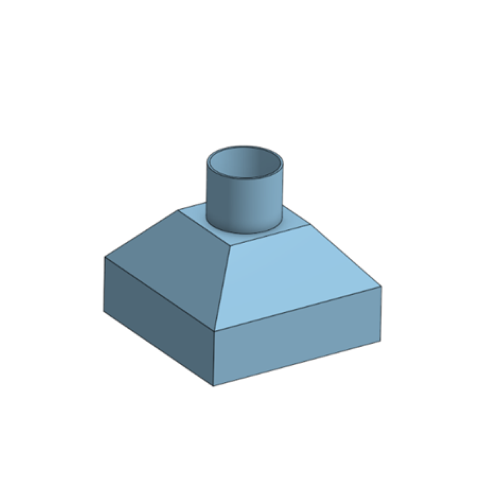
Ducts / Hoppers
2
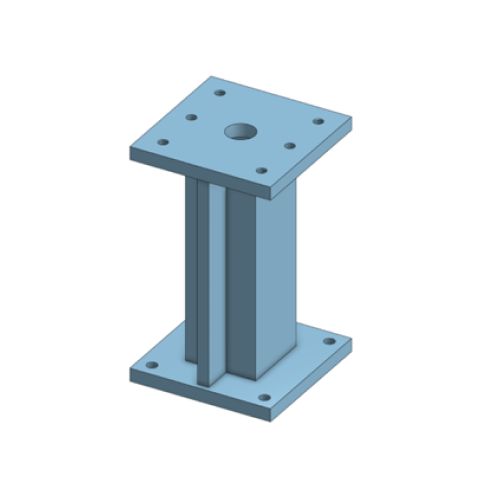
Frames or Supports That Include Steel Pipes or Structural Steel
3
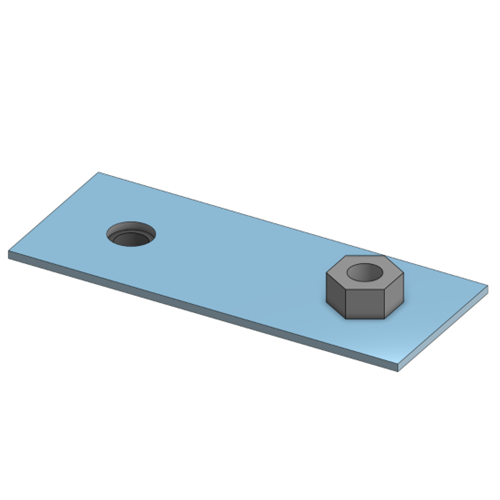
Models That Include Non–Sheet-Metal Components Such as Nuts
4
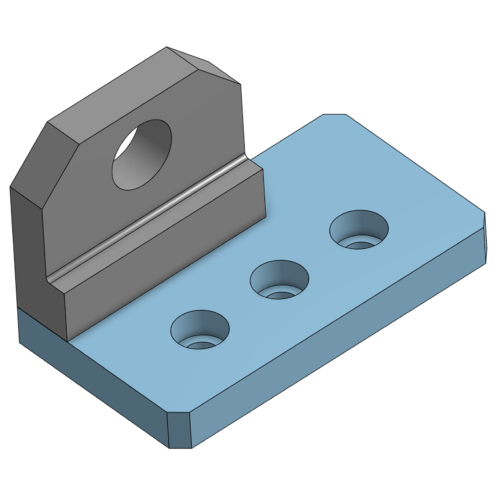
Shapes That Include Non–Sheet-Metal Machined Parts
Recently viewed articles
↑