SOLIDWORKS
Please note the following when using hole attribute linking, color attributes, and automatic recognition of threaded holes based on hole diameter in SOLIDWORKS.
Hole Type Linkage / Automatic Recognition of hole/inner diameter type from CAD Hole Attributes
①The user settings are configured so that the hole and inner diameter type is automatically recognized based on the hole attribute.
②Use the following conditions and commands to upload data to meviy.
Condition:SOLIDWORKS Native Files
Supported sizes, Version:Available design data formats
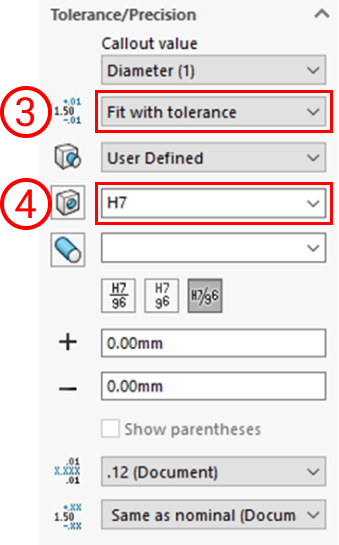
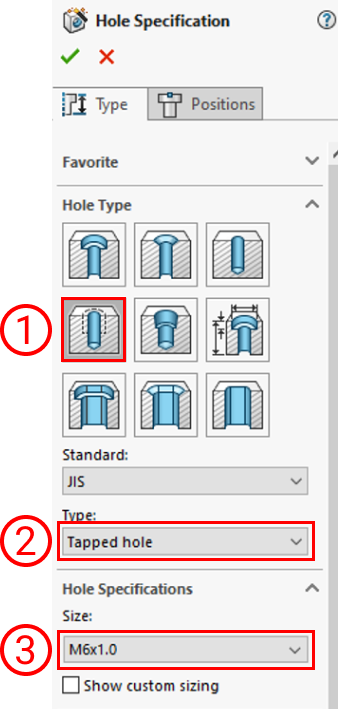
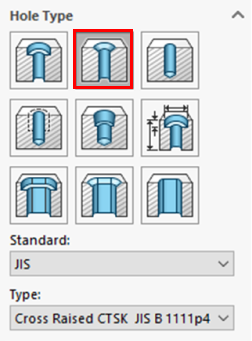
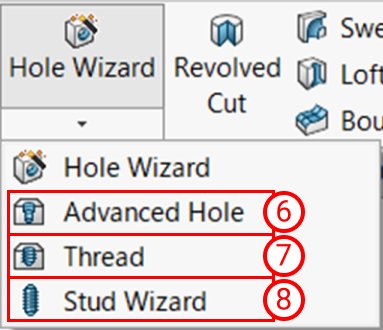
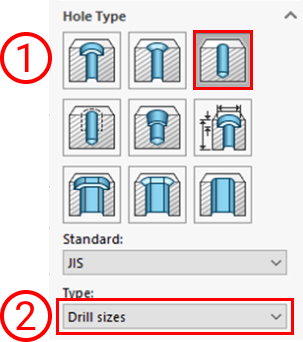
Linked hole commands
| Hole Type (meviy) | Conditions for Hole Command Setting | Description | important notice |
|---|
| Straight Hole・Through Hole | ![]() |
|
|
|---|---|---|---|
| Straight Hole
(Counterbored hole)
*Machined plates only |
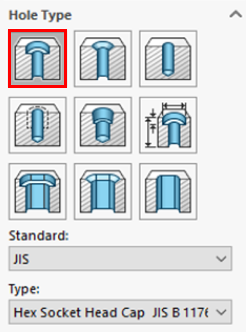
![]() |
Select “Counterbore” |
|
| Precision Holes *Machined plates only |
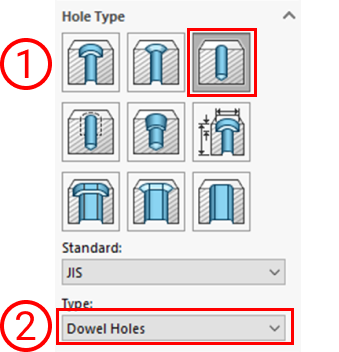
![]() |
|
|
|
![]() |
|
|
| Countersunk hole | ![]() |
|
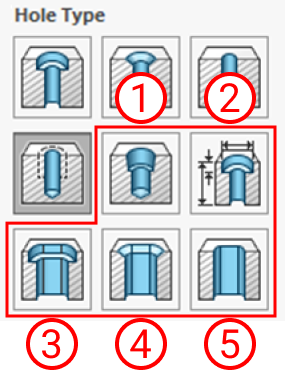
Hole commands that are not linked
| Hole Type (meviy) | Conditions for Hole Command Setting | Description | important notice |
|---|---|---|---|
| Non linkage hole① | ![]() |
|
|
| Non linkage hole② | ![]() |
|
If it is made with these hole commands, the message “Hole command not used” will be displayed. |
After uploading the data:
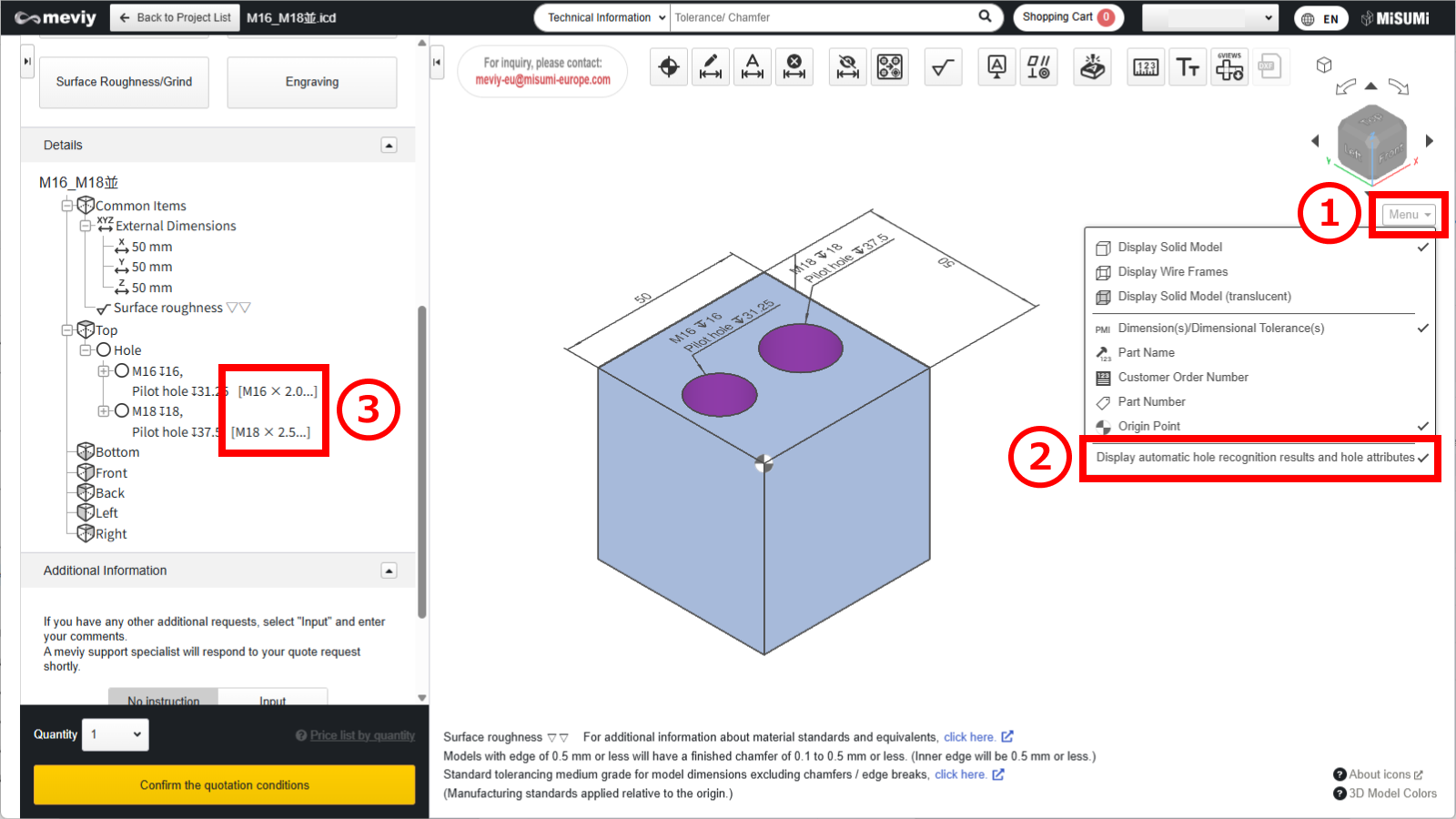
(1) Hover the mouse over [ Menu
] in the 3D viewer.
(2) Click [ Display automatic hole recognition results and hole attributes
].
(3) The list of holes in the details displays information about the linked color attributes.
Caution
Restrictions apply to the types of holes and boreholes that can be linked from the ‘Hole’ attribute.Please refer to the following precautions and adjust the meviy settings as required.
-
The effective depth of each hole is independent and reflects the user’s settings.
Set the effective depth for each item using the following user settings. - Quotation Settings for Machined Plates Tapped Holes
- Quotation Settings for Turning Parts Tapped Holes
- Quotation Settings for Machined Plates Precision Holes
- Quotation Settings for Turning Parts Precision Holes
-
If a through hole with effective depth exists, the thread direction is automatically applied.After uploading, be sure to check the thread direction in meviy.
Notes
- See below for more information.
- → CNC Milling > Recognizing Different Types of Hole
- → CNC Turning > Specifications for External Thread and Internal Thread, Keyways, Holes and Pockets
- → Sheet Metal Parts > Tapped Hole Identification and Selectable Sizes
・3D CAD format for linking hole attributes
| CAD softwares | Native | Intermediate format(Parasolid) | ||
|---|---|---|---|---|
| (.sldprt)(.icd) | .x_t | .x_b | .xmt_txt | |
| SOLIDWORKS |
〇 |
– |
– |
– |
Caution
For models and CAD formats that are not supported by meviy, there is no guarantee of automatic hole/inner diameter type recognition.| Modeling methods | Cooperation | Description |
|---|---|---|
| SOLIDWORKS Hole command | 〇 | Since hole information is available, it can be linked correctly. |
| Customised hole commands | △ | Due to special settings, proper linkage may not be possible. |
| Holes created using extruded cuts or similar methods without the Hole command | – | Not supported because no hole attributes are defined. |
Color Attributes Linkage / Automatic Recognition of hole/inner diameter type from Color Attributes
①The user settings are configured so that the hole and inner diameter type is automatically recognized based on the color attribute.
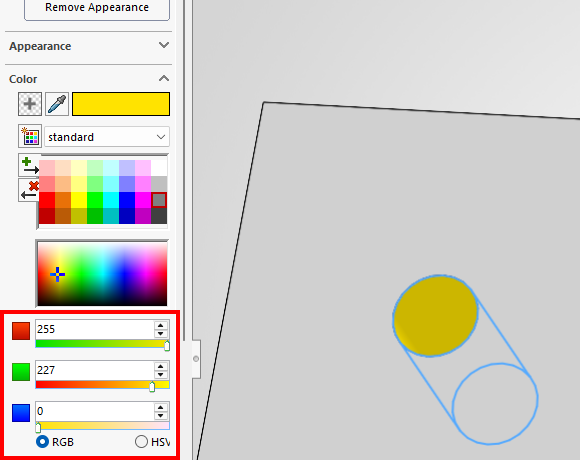
②Color the side surface of the hole in the model.
STEP1:
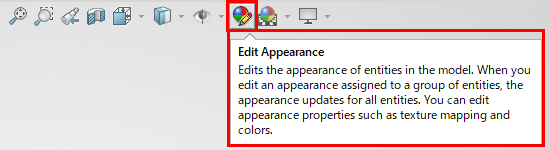
Select “Edit Appearance”.
STEP2:
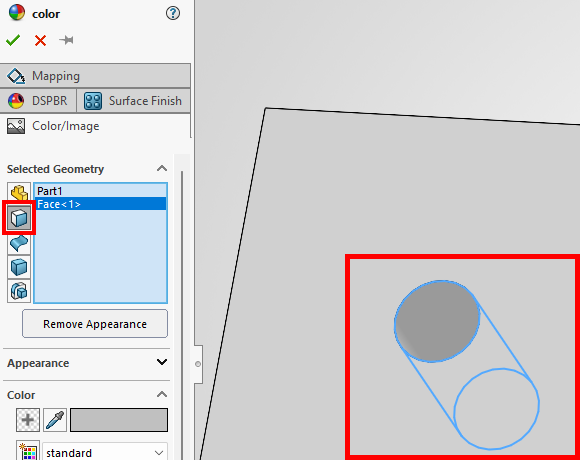
Selection geometry: Face selection
Select the inner surface and the side surface of the hole in the model.
・Meviy user settings:
STEP3:
RGB values defined in meviy, RGB coloring in SOLIDWORKS
・SOLIDWORKS RGB settings screen
③Upload the model to meviy after configuring it.
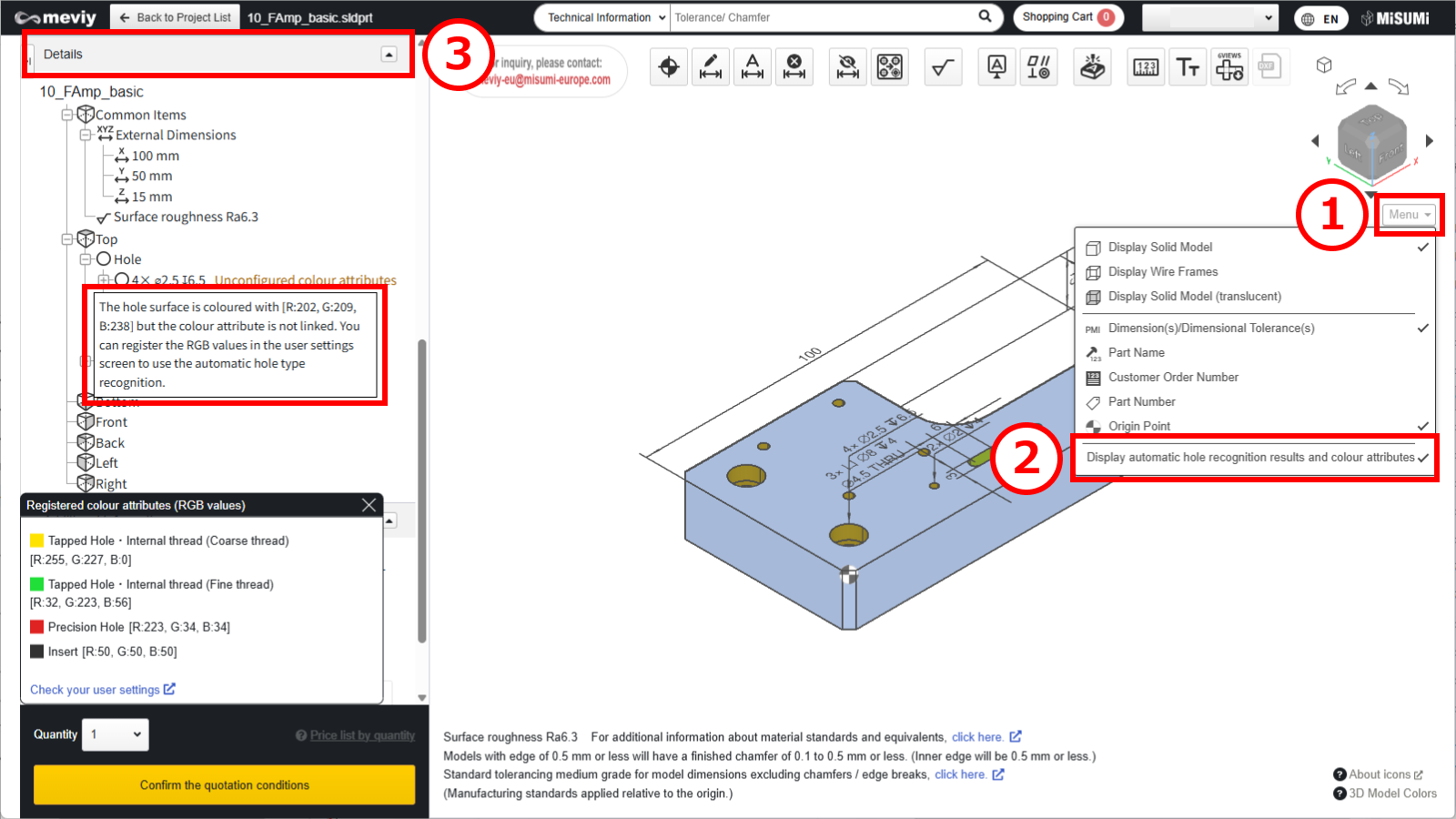
After uploading the data:
(1) Hover the mouse over [ Menu
] in the 3D viewer.
(2) Click [ Display automatic hole recognition results and colour attributes ].
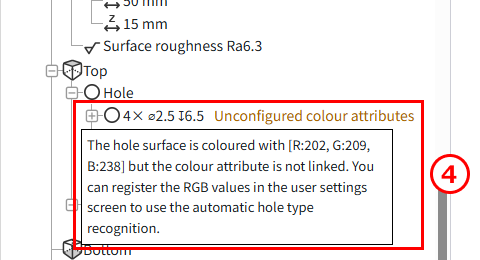
(3) The list of holes in the details displays information about the linked color attributes.
(4) To recognize the hole and inner diameter type: select “Automatically recognize threaded holes based on hole diameter (without inner diameter)” from the drop-down menu.
・3D CAD format for colour attributes
| CAD softwares | Native | Intermediate format(Parasolid) | ||
|---|---|---|---|---|
| (.sldprt) | .x_t | .x_b | .xmt_txt | |
| SOLIDWORKS |
〇 |
〇 |
〇 |
– |
Caution
The automatic recognition of hole/inner diameter type from color attribute is not guaranteed for models created with non-compatible CAD systems or formats.Automatic Recognition of Tapped holes from Hole Diameter
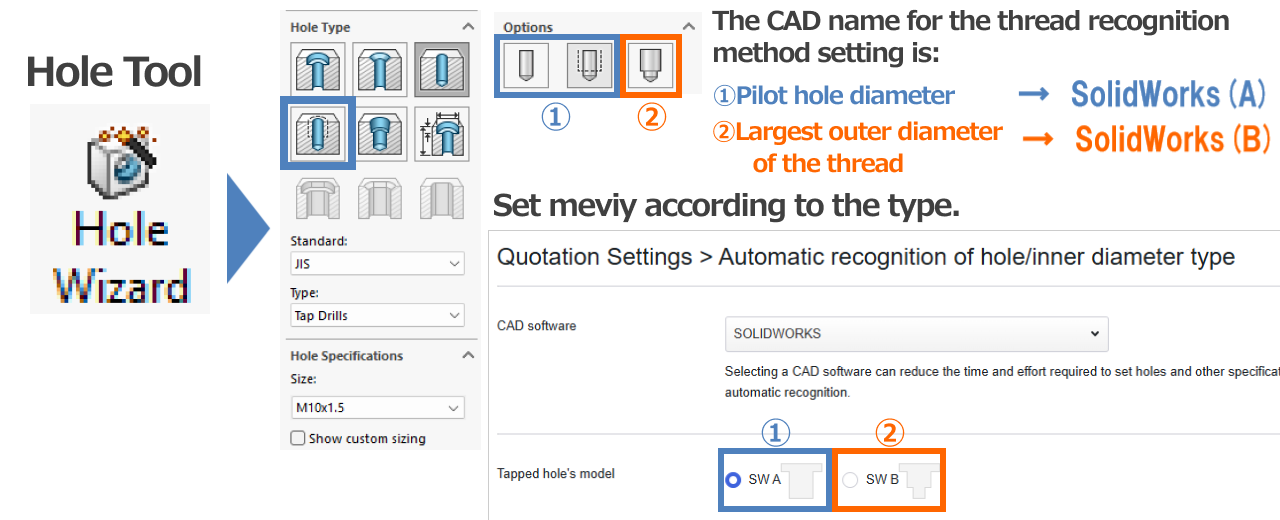
①The user settings are configured so that threaded holes are automatically recognized based on the hole diameter.
②In the user settings, select SOLIDWORKS(A) or SOLIDWORKS(B).
- SOLIDWORKS(A):Modeling based on the pilot hole diameter
- SOLIDWORKS(B):Thread modeling
User settings: “Automatic recognition of hole/hole type”
③Use the hole command with the default settings to model the thread and upload it to meviy.
Recommended:Set the thread recognition method to “3D CAD Name” (see “Recognition Conditions for Various Holes“).
|
Tap Size
(Coarse) |
SOLIDWORKS(A) | SOLIDWORKS(B) |
|---|---|---|
| M2 | 1.6 | 2 |
| M2.5 | 2.05 | 2.5 |
| M3 | 2.5 | 3 |
| M4 | 3.3 | 4 |
| M5 | 4.2 | 5 |
| M6 | 5 | 6 |
| M8 | 6.8 | 8 |
| M10 | 8.5 | 10 |
| M12 | 10.2 | 12 |
| M14 | 12 | 14 |
| M16 | 14 | 16 |
| M18 | 15.5 | 15.5 |
| M20 | 17.5 | 17.5 |
| M22 | 19.5 | 19.5 |
| M24 | 21 | 21 |
Caution
When using this feature, please make sure to review the hole auto-recognition results in meviy.-
The effective depth of each tapped hole is not linked; user-defined settings are applied instead.
Set the effective depth for each item using the following user settings. - Quotation Settings for Machined Plates Tapped Holes
- Quotation Settings for Turning Parts Tapped Holes
-
If a through hole with effective depth exists, the thread direction is automatically applied.After uploading, be sure to check the thread direction in meviy.
Notes
- See below for more information.
- → CNC Milling > Recognizing Different Types of Hole
- → CNC Turning > Specifications for External Thread and Internal Thread, Keyways, Holes and Pockets
- → Sheet Metal Parts > Tapped Hole Identification and Selectable Sizes
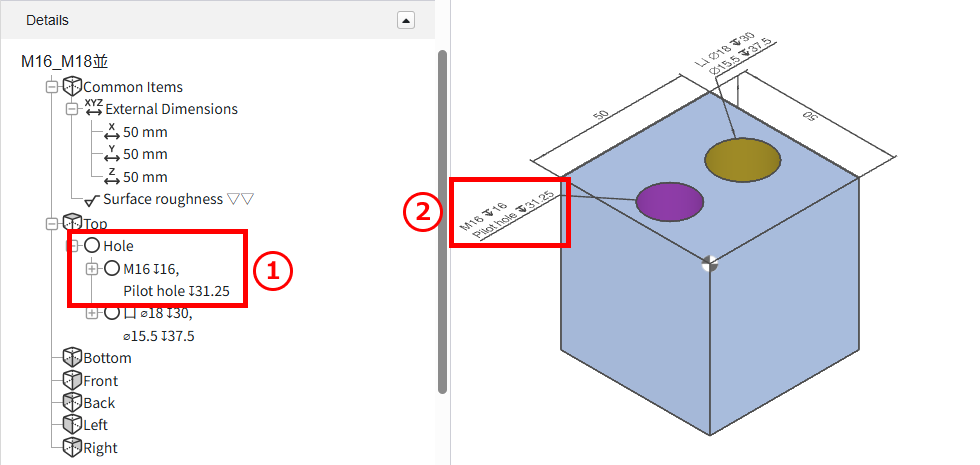
After uploading the data:
The linked threaded holes will be displayed.
- ①Hole list in the tree view
- ②In the 3D viewer